Snapchat Ads is a platform provided by Snapchat for businesses to create and manage advertising campaigns that reach Snapchat's vast user base. With Snapchat Ads, advertisers can create engaging ads in various formats, including Snap Ads, Story Ads, and Filters, to reach their target audience. The platform offers advanced targeting options based on demographics, interests, behaviors, and location, allowing advertisers to tailor their campaigns for maximum effectiveness. Additionally, Snapchat provides analytics tools to measure the performance of ads and optimize campaigns for better results.
Snapchat CAPI (Conversion API) is a server-to-server integration that allows advertisers to track conversions and send event data directly to Snapchat's servers. It enables advertisers to measure the effectiveness of their ad campaigns more accurately by bypassing browser-based tracking methods like pixels.
Product Type: Advertising
Integration Type: Starter Kit & ID Sync
Event Source Type: Web, Mobile Browser, and Mobile App
Event Scope: Full-Funnel Events
- Sends server-side conversion events directly to Snapchat's Conversions API, eliminating the need for a client-side Snapchat tag.
- Supports full-funnel events including page, product, cart, order, and promotion actions.
- Sends hashed user identifiers (email, phone, name, gender, city, state, zip, country) for privacy-safe matching.
- Captures the Snapchat click ID (
ScCid) and cookie (_scid) via the sync for attribution.
- Supports mobile app conversion events using Snapchat's
app_data parameters when app context is present.
- Derives the action source (
WEB or MOBILE_APP) from event context.
- Supports batch delivery of up to 500 events per request.
- Authentication uses a CAPI access token generated in Snapchat Events Manager.
- The Pixel ID should match the one used by any client-side Snapchat pixel so all events enter the same pipeline for deduplication. Your Pixel must be at least 24 hours old to be accepted by the authentication flow.
- The
PIXEL_ID field is optional; omit it if you do not want the sync injector to use the _scid.
- By Snapchat's request, the
integration value (metarouter) should not be changed.
- At least one match identifier is required: hashed email, hashed phone, or the IP address and user agent combination (IP and user agent must be used together).
- Snapchat Ads Integration
- Uses IP, user agent, and anonymous ID as main identifiers.
- Does not require authentication.
- Snapchat CAPI Integration
- Uses IP, user agent, anonymous ID, PII such as email and/or phone, and also supports click ID which may help with anonymous user identification.
- Supports mobile app conversion events using Snapchat CAPI app_data parameters when app context is present.
- Requires a sync injector to gather and persist the click ID.
- Authentication is required.
- Captures the
ScCid (Snapchat click ID) and _scid (Snapchat cookie) values used for user matching and attribution.
- The click ID is especially useful for identifying anonymous users.
- Without this sync, click-based matching may not be available.
- To collect the sync values (e.g.,
ScCid, _scid), you must implement a Snapchat CAPI ID sync. Refer to the following documentation to complete the setup: Snapchat CAPI - ID Sync Guide.
- Set up CAPI and generate a new access token in Snapchat Events Manager.
- Grab your Pixel ID from the Snapchat Business Dashboard: click "Pixels" in the left navigation; your Pixel ID is listed under the pixel name. Note your Pixel must be at least 24 hours old to be accepted by the authentication flow.
- From the integration library, add a Snapchat CAPI integration. Then, fill out the Connection Parameters:
| Connection Parameter | Description |
|---|
PIXEL_ID | The Pixel ID for events on a web property. If you also pass the same events via a pixel on your website, use the same pixel_id so all events enter the same pipeline for deduplication. This field is optional; omit it if you do not want the sync injector to use the _scid. Your Pixel must be at least 24 hours old to be accepted by the authentication flow. |
ACCESS_TOKEN | Generate this in Events Manager. |
- MetaRouter provides all of the event mappings that Snapchat CAPI integrations typically require. You may add custom events, parameters, or mappings in accordance with Snapchat's API documentation.
- In the Pipelines tab, add your Snapchat CAPI integration.
- Select the correct integration revision.
- Click Add Integration to finalize deployment.
Global mappings will be applied to all events. If your parameter names do not match the Expected Inputs provided, you will need to overwrite the Inputs provided with your own.
| Output Key | Description | Expected Input |
|---|
event_id Required | String: A unique identifier for the event. | messageId |
event_time Required | String: The time of the event in UNIX milliseconds. | Expression – converts the event timestamp to milliseconds since epoch |
event_source_url Required | String: The URL where the event took place. | context.page.url |
action_source Required | String: The source of the action. | Expression – returns MOBILE_APP when app context is present, otherwise WEB |
user_data.external_id Required | String: A hashed identifier for the user. | Expression – SHA-256 hashes anonymousId |
user_data.sc_click_id Highly Recommended | String: The Snapchat click ID. | context.providers.snapchatCAPI.ScCid |
user_data.sc_cookie1 Recommended | String: The Snapchat cookie ID. | context.providers.snapchatCAPI._scid |
user_data.client_ip_address Required | String: The IP address of the client. | context.ip |
user_data.client_user_agent Required | String: The user agent of the client. | context.userAgent |
user_data.em | String: The hashed email address of the user. | Expression – SHA-256 hashes trimmed, lowercased traits.email |
user_data.ph | String: The hashed phone number of the user. | Expression – SHA-256 hashes trimmed traits.phone |
user_data.fn | String: The hashed first name of the user. | Expression – SHA-256 hashes trimmed, lowercased traits.firstName |
user_data.ln | String: The hashed last name of the user. | Expression – SHA-256 hashes trimmed, lowercased traits.lastName |
user_data.ge | String: The hashed gender of the user. | Expression – SHA-256 hashes trimmed, lowercased traits.gender |
user_data.ct | String: The hashed city of the user. | Expression – SHA-256 hashes normalized traits.address.city |
user_data.st | String: The hashed state of the user. | Expression – SHA-256 hashes trimmed, lowercased traits.address.state |
user_data.zp | String: The hashed zip code of the user. | Expression – SHA-256 hashes trimmed traits.address.postalCode |
user_data.country | String: The hashed country of the user. | Expression – SHA-256 hashes trimmed traits.address.country |
integration Required | String: A static value for integration type. By Snapchat's request, do not change the metarouter value. | Enrichment – 'metarouter' |
app_data.advertiser_tracking_enabled | Boolean: Indicates whether ad tracking is enabled on the device. | context.device.adTrackingEnabled |
app_data.app_id | String: Mobile application bundle or package identifier. | context.app.namespace |
app_data.extinfo | Array: Mobile app and device metadata required by Snapchat for app events. | Expression – derived from device, OS, and app context |
| Output Key | Description | Expected Input |
|---|
event_name Required | String: The name of the event. | Enrichment – 'LOGIN' |
| Output Key | Description | Expected Input |
|---|
event_name Required | String: The name of the event. | Enrichment – 'PAGE_VIEW' |
custom_data.content_name | String: The name of the content. | Expression – returns properties.name or properties.title |
| Output Key | Description | Expected Input |
|---|
event_name Required | String: The name of the event. | Enrichment – 'SEARCH' |
custom_data.search_string | String: The search string used. | properties.query |
| Output Key | Description | Expected Input |
|---|
event_name Required | String: The name of the event. | Enrichment – 'LIST_VIEW' |
custom_data.content_category | String: The category of the content. | properties.category |
custom_data.content_ids | Array: An array of content IDs. | Expression – plucks product_id from properties.products |
custom_data.content_type | String: The type of content. | Enrichment – 'product' |
| Output Key | Description | Expected Input |
|---|
event_name Required | String: The name of the event. | Enrichment – 'VIEW_CONTENT' |
custom_data.content_name | String: The name of the content. | properties.name |
custom_data.content_category | String: The category of the content. | properties.category |
custom_data.content_ids | String: The ID of the content. | properties.product_id |
custom_data.content_type | String: The type of content. | Enrichment – 'product' |
| Output Key | Description | Expected Input |
|---|
event_name Required | String: The name of the event. | Enrichment – 'ADD_CART' |
custom_data.content_name | String: The name of the content. | properties.name |
custom_data.content_category | String: The category of the content. | properties.category |
custom_data.content_ids | String: The ID of the content. | properties.product_id |
custom_data.contents | Array: Builds content details with id, quantity, and item_price. | Expression – builds from properties |
custom_data.currency | String: The currency of the transaction. | properties.currency (uppercased, default USD) |
custom_data.num_items | String: The number of items. | properties.quantity |
custom_data.value | Number: The value of the transaction. | Expression – price × quantity |
custom_data.content_type | String: The type of content. | Enrichment – 'product' |
| Output Key | Description | Expected Input |
|---|
event_name Required | String: The name of the event. | Enrichment – 'ADD_TO_WISHLIST' |
custom_data.content_name | String: The name of the content. | properties.name |
custom_data.content_category | String: The category of the content. | properties.category |
custom_data.content_ids | String: The ID of the content. | properties.product_id |
custom_data.contents | Array: Builds content details with id, quantity, and item_price. | Expression – builds from properties |
custom_data.currency | String: The currency of the transaction. | properties.currency (uppercased, default USD) |
custom_data.num_items | String: The number of items. | properties.quantity |
custom_data.value | Number: The value of the transaction. | Expression – price × quantity |
custom_data.content_type | String: The type of content. | Enrichment – 'product' |
| Output Key | Description | Expected Input |
|---|
event_name Required | String: The name of the event. | Enrichment – 'VIEW_CONTENT' |
custom_data.content_name | String: The name of the content. | Expression – returns properties.name or properties.title |
custom_data.content_ids | Array: An array of content IDs. | Expression – plucks product_id from properties.products |
custom_data.contents | Array: Builds content details per product with id, quantity, and item_price. | Expression – maps properties.products |
custom_data.currency | String: The currency of the transaction. | properties.currency (uppercased, default USD) |
custom_data.num_items | String: The number of items. | Expression – sums quantity across properties.products |
custom_data.value | Number: The value of the transaction. | Expression – sums price × quantity across properties.products |
custom_data.content_type | String: The type of content. | Enrichment – 'product' |
| Output Key | Description | Expected Input |
|---|
event_name Required | String: The name of the event. | Enrichment – 'START_CHECKOUT' |
custom_data.content_name | String: The name of the content. | Expression – returns properties.name or properties.title |
custom_data.content_ids | Array: An array of content IDs. | Expression – plucks product_id from properties.products |
custom_data.contents | Array: Builds content details per product with id, quantity, and item_price. | Expression – maps properties.products |
custom_data.currency | String: The currency of the transaction. | properties.currency (uppercased, default USD) |
custom_data.num_items | String: The number of items. | Expression – sums quantity across properties.products |
custom_data.value | Number: The value of the transaction. | Expression – sums price × quantity across properties.products |
custom_data.content_type | String: The type of content. | Enrichment – 'product' |
| Output Key | Description | Expected Input |
|---|
event_name Required | String: The name of the event. | Enrichment – 'ADD_BILLING' |
custom_data.content_name | String: The name of the content. | properties.order_id |
| Output Key | Description | Expected Input |
|---|
event_name Required | String: The name of the event. | Enrichment – 'PURCHASE' |
custom_data.content_name | String: The name of the content. | Expression – returns properties.name or properties.title |
custom_data.content_ids | Array: An array of content IDs. | Expression – plucks product_id from properties.products |
custom_data.contents | Array: Builds content details per product with id, quantity, and item_price. | Expression – maps properties.products |
custom_data.currency Required | String: The currency of the transaction. | properties.currency (uppercased, default USD) |
custom_data.num_items | String: The number of items. | Expression – sums quantity across properties.products |
custom_data.order_id | String: The order ID. | properties.order_id |
custom_data.value Required | Number: The value of the transaction. | Expression – sums price × quantity across properties.products |
custom_data.content_type | String: The type of content. | Enrichment – 'product' |
| Output Key | Description | Expected Input |
|---|
event_name Required | String: The name of the event. | Enrichment – 'AD_VIEW' |
custom_data.content_name | String: The name of the content. | properties.name |
| Output Key | Description | Expected Input |
|---|
event_name Required | String: The name of the event. | Enrichment – 'AD_CLICK' |
custom_data.content_name | String: The name of the content. | properties.name |
These identifiers must be mapped to Snapchat CAPI in order for successful user matching to occur. Without these IDs, any events sent to Snapchat CAPI may not be accurately reflected in reporting. For your convenience, required and recommended IDs are mapped as Global parameters to ensure they are added to every event.
| Attribute | Example | Sync Injector Required? |
|---|
user_data.em * Required | 587dfd511a0c05a6d71c4afae60bece0a5f8ccf2f7e7b1c74e3b9f1a5f8f5152 | No |
user_data.ph * Required | b1a8fd06fc2a2d5f2f03027e6d0d85ad9a9c0d1dcb8821b4d4cfc4d6d38b8b82 | No |
user_data.client_ip_address * Required | 192.168.0.1 | No |
user_data.client_user_agent * Required | Mozilla/5.0 (Windows NT 10.0; Win64; x64) | No |
user_data.sc_click_id Highly Recommended | 7b3a7917-a82a-47e8-9728-e1b3b045abb2 | Yes |
*At least one match identifier is required: hashed email (em), hashed phone (ph), or the IP address and user agent combination (if using one, you must use both).
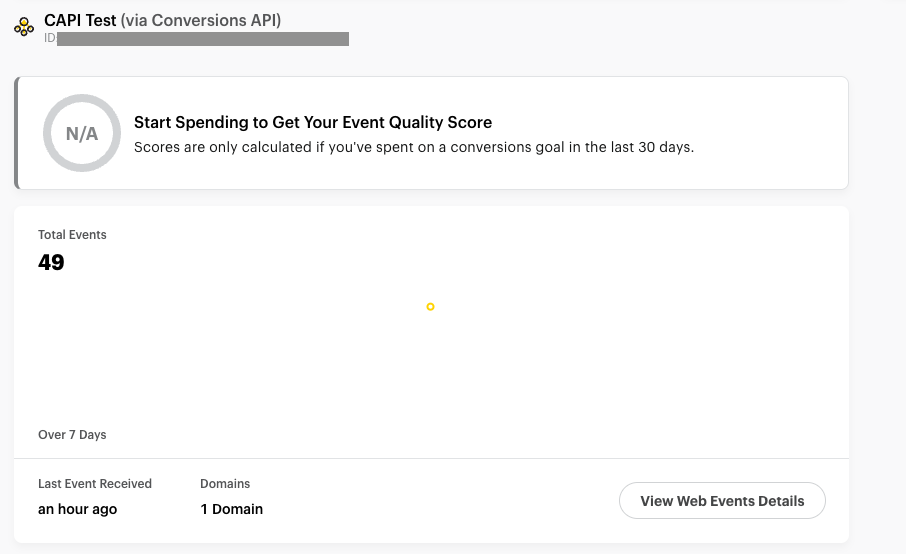
Coordinate with your Snapchat representative, or use the Snapchat Events Manager dashboard, to confirm that events are being received and processed correctly on their backend. In Events Manager, select the event source you set up for the integration to see events populating.