Teads is a global advertising platform specializing in outstream video and display ads that appear within premium publisher content. They work with major media outlets to deliver high-quality, brand-safe inventory across desktop, mobile web, and in-app environments. Teads offers both direct and programmatic buying options, with advanced targeting, viewability optimization, and measurement tools. Advertisers can run campaigns focused on awareness, engagement, or conversions, and track performance through Teads’ analytics and reporting suite. Their technology is designed to provide a non-intrusive ad experience while maximizing reach and engagement.
Product Type: Advertising
Integration Type: Starter Kit & ID Sync
Event Source Type: Web
Event Scope: Full-Funnel Events
- Tracks full-funnel conversion events using Teads server-to-server postbacks
- Attributes conversions using a Teads-generated click ID
- Supports optional order ID, order value, currency, and timestamp parameters
- Enables conversion tracking without collecting or transmitting PII
- Supports advertisers running Teads through a Teads managed service. If you are not running through Teads managed services, please use the Teads CAPI integration.
- This integration is intended for advertisers who work with Teads through a managed service, which is a prerequisite for using it. Coordinate with your Teads representative to confirm a managed service is in place. If you are not running through Teads managed services, please use the Teads CAPI integration.
- The same Teads URL Decorator value must be configured in both the sync and the starter kit for proper attribution.
- This integration sends conversion events via a GET-based pixel endpoint using URL query parameters only.
- In our testing, requests above ~20,000 characters in the URL began to fail. While this isn’t a formally documented limit, it may be a practical constraint to consider when using this integration.
- All values must be URL-encoded and arrays pipe-delimited.
- One request per event; batching not supported.
- Complex lists, such as product arrays used to calculate order value, must be manually encoded and pipe-delimited.
- The integration depends on a Teads click ID captured via the Teads URL Decorator; without it, conversions may not be attributed.
- The
name parameter must exactly match the event-based conversion name created in the Teads dashboard and is case-sensitive.
- Each event mapping includes a static placeholder for the conversion name that must be replaced with the correct Teads-defined value.
- The endpoint typically returns HTTP 200 responses even when fields are missing or incorrectly formatted, so delivery success does not guarantee attribution.
- The starter kit formats timestamps to
yyyy-MM-ddTHH:mm:ss, one of Teads’ supported timestamp formats.
- Only conversions that occur after a Teads ad click can be attributed.
- Batching or bulk conversion uploads are not supported.
- There is no authentication or error feedback mechanism beyond HTTP success responses.
- Sync Available: Yes
- Required for Starter Kit: Yes
- Prerequisites: Teads managed service; Tracking Code Suffix - Teads URL Decorator configured in Teads campaigns
- Documentation: See Additional Teads Documentation
- Captures the Teads click ID from a configurable URL parameter.
- Stores the click ID in first-party storage for a configurable duration.
- Enhances all server-side events with the captured click ID.
- Required to link conversion events back to Teads ad clicks.
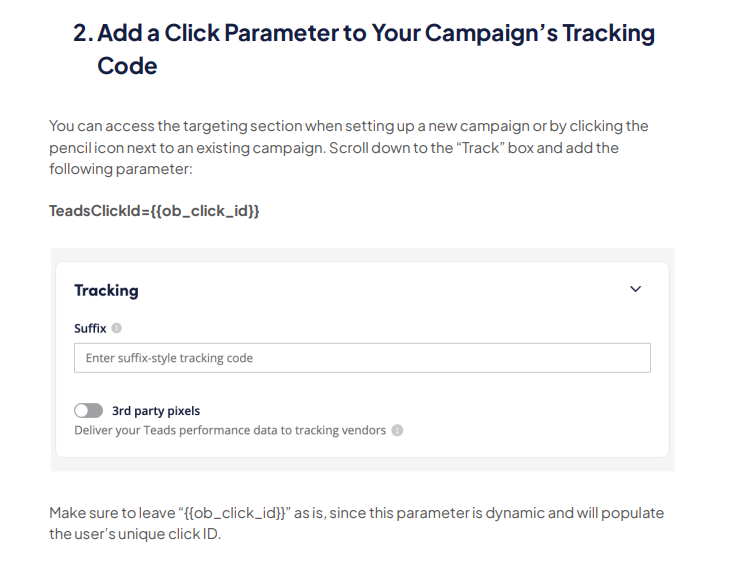
- To collect the sync values (e.g., Teads click ID), you must implement a Teads ID sync. Refer to the following documentation to complete the setup: Teads – ID Sync Guide.
- From the integration library, add a Teads Postback integration. Then, fill out the Connection Parameters:
| Connection Parameter | Description |
|---|
TEADS_URL_DECORATOR | Custom URL parameter name used by Teads to pass the click ID. Referred to as Tracking Code Suffix by Teads. This must match the URL Decorator set in the sync. I.e. TeadsClickId |
- MetaRouter provides all of the event mappings that Teads integrations typically require. You may add custom events, parameters, or mappings in accordance with Teads’ API documentation.
- In the Pipelines tab, add your Teads Postback integration.
- Select the correct integration revision.
- Click Add Integration and finalize deployment.
Global mappings will be applied to all events. If your parameter names do not match the Expected Inputs provided, you will need to overwrite the Inputs provided with your own.
| Output Key | Description | Expected Input |
|---|
ob_click_id Required | String: Teads click ID used for attribution. | context.providers.teads.$$TEADS_URL_DECORATOR$$ |
timestamp | String: Event timestamp formatted for Teads. | Expression – trims timestamp to yyyy-MM-ddTHH:mm:ss |
| Output Key | Description | Expected Input |
|---|
name Required | String: Teads event-based conversion name. | Enrichment – 'ADD_EVENT_BASED_CONVERSION_NAME_HERE' |
| Output Key | Description | Expected Input |
|---|
name Required | String: Teads event-based conversion name. | Enrichment – 'ADD_EVENT_BASED_CONVERSION_NAME_HERE' |
| Output Key | Description | Expected Input |
|---|
name Required | String: Teads event-based conversion name. | Enrichment – 'ADD_EVENT_BASED_CONVERSION_NAME_HERE' |
orderValue | Float: Total value of products in the list. | Expression – sums input.properties.products |
| Output Key | Description | Expected Input |
|---|
name Required | String: Teads event-based conversion name. | Enrichment – 'ADD_EVENT_BASED_CONVERSION_NAME_HERE' |
orderValue | Float: Price of the clicked product. | properties.price |
| Output Key | Description | Expected Input |
|---|
name Required | String: Teads event-based conversion name. | Enrichment – 'ADD_EVENT_BASED_CONVERSION_NAME_HERE' |
orderValue | Float: Price of the viewed product. | properties.price |
currency | String: ISO currency code in uppercase. | properties.currency |
| Output Key | Description | Expected Input |
|---|
name Required | String: Teads event-based conversion name. | Enrichment – 'ADD_EVENT_BASED_CONVERSION_NAME_HERE' |
orderId | String: Cart identifier. | properties.cart_id |
orderValue | Float: Price of the added product. | properties.price |
| Output Key | Description | Expected Input |
|---|
name Required | String: Teads event-based conversion name. | Enrichment – 'ADD_EVENT_BASED_CONVERSION_NAME_HERE' |
orderId | String: Cart identifier. | properties.cart_id |
orderValue | Float: Price of the removed product. | properties.price |
| Output Key | Description | Expected Input |
|---|
name Required | String: Teads event-based conversion name. | Enrichment – 'ADD_EVENT_BASED_CONVERSION_NAME_HERE' |
orderId | String: Cart identifier. | properties.cart_id |
currency | String: ISO currency code in uppercase. | properties.currency |
orderValue | Float: Total value of products in the cart. | Expression – sums input.properties.products |
| Output Key | Description | Expected Input |
|---|
name Required | String: Teads event-based conversion name. | Enrichment – 'ADD_EVENT_BASED_CONVERSION_NAME_HERE' |
orderId | String: Order identifier. | properties.order_id |
currency | String: ISO currency code in uppercase. | properties.currency |
orderValue | Float: Total value of products in checkout. | Expression – sums input.properties.products |
| Output Key | Description | Expected Input |
|---|
name Required | String: Teads event-based conversion name. | Enrichment – 'ADD_EVENT_BASED_CONVERSION_NAME_HERE' |
orderId | String: Order identifier. | properties.order_id |
| Output Key | Description | Expected Input |
|---|
name Required | String: Teads event-based conversion name. | Enrichment – 'ADD_EVENT_BASED_CONVERSION_NAME_HERE' |
orderId | String: Order identifier. | properties.order_id |
currency | String: ISO currency code in uppercase. | properties.currency |
orderValue | Float: Total value of purchased products. | Expression – sums input.properties.products |
| Output Key | Description | Expected Input |
|---|
name Required | String: Teads event-based conversion name. | Enrichment – 'ADD_EVENT_BASED_CONVERSION_NAME_HERE' |
| Output Key | Description | Expected Input |
|---|
name Required | String: Teads event-based conversion name. | Enrichment – 'ADD_EVENT_BASED_CONVERSION_NAME_HERE' |
These identifiers must be mapped to Teads in order for successful user matching to occur. Without these IDs, any events sent to Teads may not be accurately reflected in reporting.
| Attribute | Example | Sync Injector Required? |
|---|
ob_click_id Required | abc123xyz | Yes |
- Please contact your Teads representative to confirm that conversion events are being received and reflected in Teads reporting.
- The endpoint typically returns HTTP 200 responses even when fields are missing or incorrectly formatted, so delivery success does not guarantee attribution.
- Contact your Teads representative for official server-side tracking documentation.